Looking for a reliable soil moisture sensor system to automate and optimize your irrigation? This guide highlights five tested options that work well with sprinkler timers and wireless hubs. Each pick targets different needs—from compact Bluetooth setups to WiFi-connected networks for larger gardens. Best for: small yards needing simple Bluetooth integration; medium to large gardens requiring WiFi-based automation; and tech-savvy users who want expandable, multi-zone monitoring.
| Product | Brand | Connectivity | Best For | Key Strength |
|---|---|---|---|---|
| Eden 25417 Wireless Soil Moisture Sensor for Bluetooth Timer | Eden | Bluetooth | Simple Bluetooth setups with Eden timers | Wireless range up to 100 meters; protects plants from overwatering |
| RAINPOINT WiFi Soil Moisture Sensor | RAINPOINT | WiFi | Standalone WiFi control with app history | 10-meter stability near hub; 0–100% moisture range |
| RAINPOINT Bluetooth 2-in-1 Soil Moisture & Air Temp Meter | RAINPOINT | Bluetooth (with WiFi gateway) | Bluetooth sensors with optional WiFi gateway integration | 2-second refresh; supports remote automation when paired |
| Nexuslab Wireless Soil Moisture Meter with LCD Receiver | NexusLab | RF Wireless | Expandable multi-zone monitoring | Expandable to 12 zones; 230 ft range |
| Moen Smart Wireless Soil Sensor | Moen | WiFi (with Moen controller) | Exterior lawn watering with threshold alerts | Depth-based moisture & temp readings; automated adjustments |
Eden 25417 Wireless Soil Moisture Sensor for Bluetooth Timer
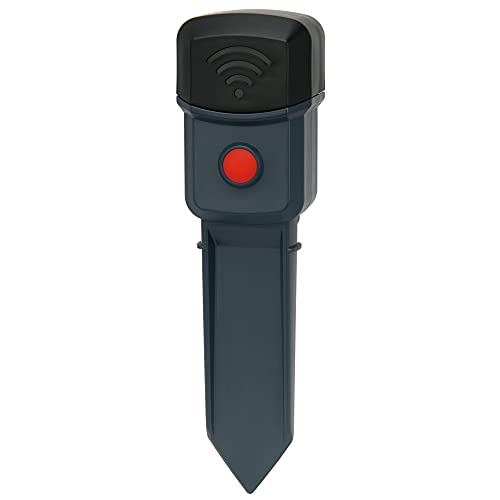
The Eden sensor works best for buyers using Eden Bluetooth Water Timers. It monitors soil moisture to protect plants from overwatering and enables easy set-up with Eden Bluetooth and Digital Water Timers. The wireless range extends up to 328 feet (100 meters) from the water timer, making it suitable for small to mid-sized homes where a single timer controls multiple zones.
Who this is best for: Home gardeners who prefer a straightforward, Bluetooth-based solution and already use Eden timers. Why selected: Simpler ecosystem, direct integration, and clear moisture readings help prevent overwatering in uncomplicated setups.
Caution: Bluetooth range can be affected by walls and interference; ensure line-of-sight or near the timer for optimal data transmission.
RAINPOINT WiFi Soil Moisture Sensor
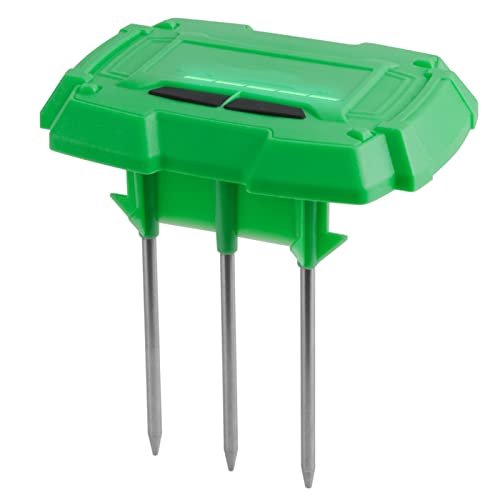
The RainPoint WiFi Sensor is designed for automated irrigation systems in homes with a compatible WiFi sprinkler timer and hub. It should be used as an add-on and requires pairing with specific RainPoint hardware. It provides app-based monitoring of soil moisture and temperature with a 10-meter stable connection to the hub, and can automatically adjust watering schedules when paired with a compatible timer and hub.
Who this is best for: Gardeners who want remote monitoring and automation via a dedicated WiFi hub. Why selected: Strong app-based visibility and automatic on/off control reduce manual watering mistakes.
Caution: Limited use per zone and requires compatible RainPoint hardware to function as intended; installation depth of the probe affects readings.
RAINPOINT Bluetooth 2-in-1 Soil Moisture & Air Temp Meter

This Bluetooth soil meter provides real-time monitoring of soil moisture and air temperature, accessible via the RAINPOINT app. When paired with a WiFi gateway, it links to a compatible timer to auto-adjust watering. It is best for users who want quick data with the flexibility to upgrade to WiFi control later.
Who this is best for: Home growers seeking quick, data-backed watering decisions with future WiFi expansion. Why selected: Fast data refresh and seamless integration with a gateway for remote control.
Caution: Requires pairing with a gateway for full automation; standalone Bluetooth use is limited to nearby proximity.
Nexuslab Wireless Soil Moisture Meter with LCD Receiver
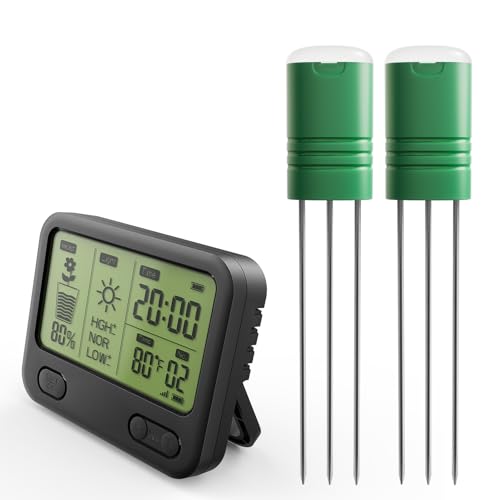
The Nexuslab system emphasizes expandability and professional-grade readings. It starts with two sensors and can expand to 12 zones, making it ideal for larger gardens or multi-zone setups. It uses RF wireless technology with a range up to 230 feet, allowing you to monitor status from indoors.
Who this is best for: Gardeners who need a scalable, multi-zone solution for larger properties. Why selected: The expandable design and accurate TDR-based readings support precise irrigation control.
Caution: Range may be reduced by walls or obstacles; setup complexity increases with more zones to manage.
Moen Smart Wireless Soil Sensor

The Moen sensor focuses on monitoring soil moisture and temperature at multiple depths (1, 3, and 5 inches) to determine when irrigation is needed. It communicates with Moen’s Smart Sprinkler Controller to automatically adjust schedules, aiming to reduce water waste while ensuring healthy turf and beds.
Who this is best for: Exterior lawn and garden owners who want integrated irrigation automation with a dedicated timer system. Why selected: Depth-based readings help fine-tune watering more precisely than surface-only sensors.
Caution: Requires a compatible Moen controller to enable full automation.
Buying Guide
What to consider when choosing a soil moisture sensor system
- Compatibility with your existing timer or hub: Ensure the sensor works with your sprinkler timer, whether Bluetooth, WiFi, or RF-based.
- Number of zones: If you have multiple planting beds, check expandability (2, 4, 8, or 12+ zones) and how readings are displayed.
- Sensor placement and readings: Depth sensitivity, soil type resilience, and probe visibility affect accuracy. Look for sensors with proven performance in varied soils.
- Connectivity range: Bluetooth is short-range, while RF and WiFi offer broader coverage. Consider home layout and potential interference sources.
- App features: Look for history graphs, 10-day or longer data history, and alert options to help you act before plants suffer underwatering or overwatering.
- Power and battery life: Long-lasting batteries reduce maintenance. Some models offer rechargeable options or low-power modes.
- Data privacy and cloud access: Decide if you prefer local dashboard access or cloud-based monitoring with remote alerts.
How to set up for reliable performance
- Place sensors in representative spots: not in roots-only zones; avoid dense mulch or compacted patches that affect readings.
- Secure probe depth: Follow manufacturer guidance on optimal insertion depth to reflect average soil moisture for the root zone.
- Test baseline readings: Record moisture and temperature values for a week to establish a baseline before adjusting irrigation schedules.
- Calibrate with timers: If your system supports dynamic scheduling, link sensor thresholds to zone-specific watering rules.
- Regular maintenance: Check batteries, clean probes, and ensure the hub or gateway remains within effective range.
Comparison snapshot
- Best for simple Bluetooth ecosystems: Eden 25417.
- Best for WiFi-based automation with app history: RAINPOINT WiFi Sensor.
- Best for mixed Bluetooth-to-WiFi expansions: RAINPOINT 2-in-1 Bluetooth Meter.
- Best for large, expandable zones: Nexuslab Wireless Meter (up to 12 zones).
- Best for exterior lawn automation: Moen Smart Wireless Sensor.
FAQ
- Do soil moisture sensors require an internet connection? Some do, via WiFi hubs or cloud services; Bluetooth-only models do not require internet but need proximity to the timer.
- Can multiple sensors control a single zone? Yes, many systems support one sensor per zone, while expandable kits allow multi-zone monitoring.
- What depth should sensors be placed at for lawns and beds? Place at depths corresponding to the root zone of your plants—typically 4–6 inches for lawns, deeper for established beds, but follow the product’s guidance.
- Are readings affected by soil type? Yes, soil salinity and texture can influence readings; some sensors use technologies like TDR to improve accuracy.
- Is data history important for watering decisions? Yes; longer data history helps optimize schedules and detect trends indicating drought stress or overwatering.
- Can these sensors work with non-proprietary timers? Some do, but many rely on specific ecosystems (brand-specific hubs or gateways). Verify compatibility before purchase.